Build an Ops Board in Workshop: the Error Toast That Lies, the Branch Wall, and the 300px Trap
We built the first Workshop app of the manual: FM-WS-01 maintenance ops board, a single-section module with one object table bound to the demo type [Example] Route Alert (14 objects, 23 properties), published to v0.3.0 at ri.workshop.main.module.ff2edd2c-307b-441c-8605-419e39bfb2c7. The session produced four field repairs. The module creation error toast lied to us verbatim (An error occurred while saving, plus the platform's own typo 'occured'), firing three stacked instances while the module persisted server-side and Save and publish stayed disabled. The object set picker cannot see branch resources at all and answers a Work Order search with 'Refine your search term to find more results.' The Main dropdown in the top bar versions the app, not the ontology. And the default section width, Column width Absolute 300 px, makes a freshly published app look broken until you switch Dimensions to Flex. Plain scope statement: this module is read-only. The Writeback tab exists in the widget catalog and is FM-WS-02's door.
- FM-ON-01. The Work Order type and the branch this module cannot reach come from there.
- FM-ON-02. The Reassign technician action and the dry run that this module would have executed, if the branch wall allowed it.
Field notes from the Avinyr lab. Everything below was observed live on 2026-09-07 in Workshop on our cloud enrollment, between about 16:40 and 17:52 local time. The maintenance data behind our ontology is synthetic, labeled synthetic, and generated by us; the route alert data in this module is the enrollment's own demo ontology. Every screenshot is ours.
[ READ THIS FIRST: WHAT THIS MODULE IS ]
FM-ON-02 ended with a dry run and a promise: the action editor's Test run proved our Reassign technician action correct, but applying it for real needs an app surface. This module builds that surface. It is also the module where we learned, on camera, that the surface cannot reach the thing we built. Workshop reads the main ontology. Our Work Order type and its action live on a branch. So this module does two jobs: it teaches you to build a working Workshop ops board end to end (create, bind, publish, fix the layout), and it maps the exact walls you will hit when your ontology work is unmerged.
Here is the honest scope. The board we ship is read-only: one object table, 14 demo route alerts, all properties as columns. The widget catalog has a Writeback tab, and we noted it, and we did not touch it. Wiring an action into this board, executing a real write, and proving persistence is FM-WS-02, and it runs against the same demo type for the same branch-wall reason.
[ WHAT YOU WILL HAVE AT THE END ]
One published Workshop module: FM-WS-01 maintenance ops board, RID ri.workshop.main.module.ff2edd2c-307b-441c-8605-419e39bfb2c7, in the Outer Heaven Hub Project, published v0.3.0, viewable at /workspace/module/view/latest/ri.workshop.main.module.ff2edd2c-307b-441c-8605-419e39bfb2c7. One object set variable bound to [Example] Route Alert (14 objects, 23 properties). One object table with all properties as columns, showing real rows: SEA -> LAX, JFK -> SFO, MCO -> EWR, and eight more route pairs. One section set to Flex width so the published page actually fits the table. And four field repairs with verbatim UI strings, including an error toast that reports failure while the platform succeeds.
| What you might expect | What Foundry actually does |
|---|---|
| A red error toast on save means the save failed | The toast, verbatim: An error occurred while saving {"message": "Error occured while creating module."}. The module was created server-side anyway and sat in Recents the whole time |
| One error toast per failure | Three stacked instances at once, repeating on every save attempt, with Save and publish disabled |
| The object set picker can find your object types | It lists main-ontology demo types only. Searching our branch type Work Order returns, verbatim: "Refine your search term to find more results." |
| The Main dropdown switches ontology branch | It is module branching. It versions the app. The ontology data context is main, full stop |
| A freshly published app looks reasonable by default | The default section width is Column width Absolute 300 px, which squeezes a 23-column table into a narrow strip. Fix: Dimensions > Column width > Flex |
[ STEP 1: CREATE THE MODULE, AND MEET THE TOAST THAT LIES ]
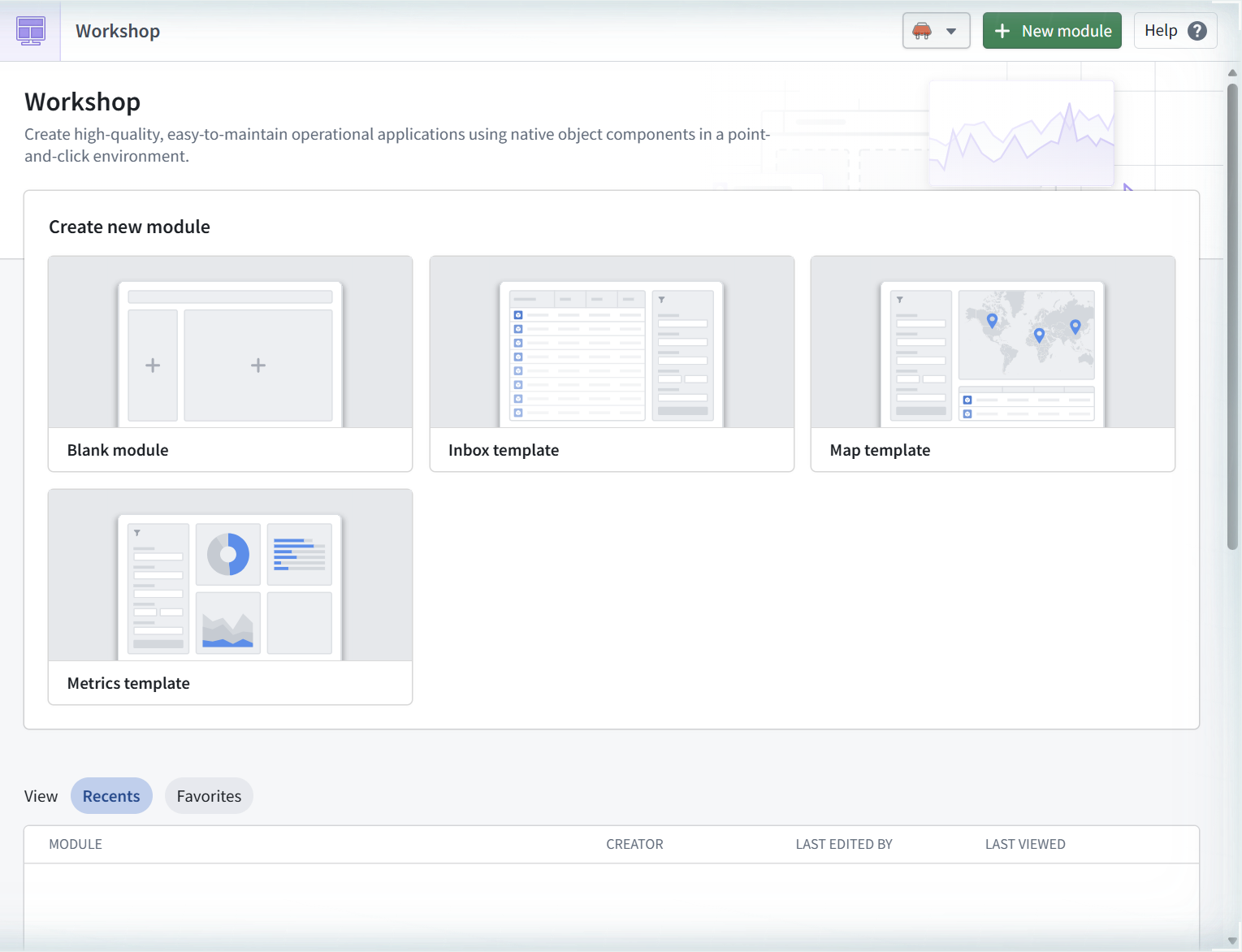
Workshop's front door is the splash page at /workspace/module/splash. Its pitch, verbatim: "Create high-quality, easy-to-maintain operational applications using native object components in a point-and-click environment." Four templates: Blank module, Inbox template, Map template, Metrics template. Recents was empty. This was the enrollment's first module.
Blank module opens a Save as dialog prefilled "New Module - 2026-09-07 17:03:43", location Outer Heaven Hub Project. We named it "FM-WS-01 maintenance ops board" and hit Save.
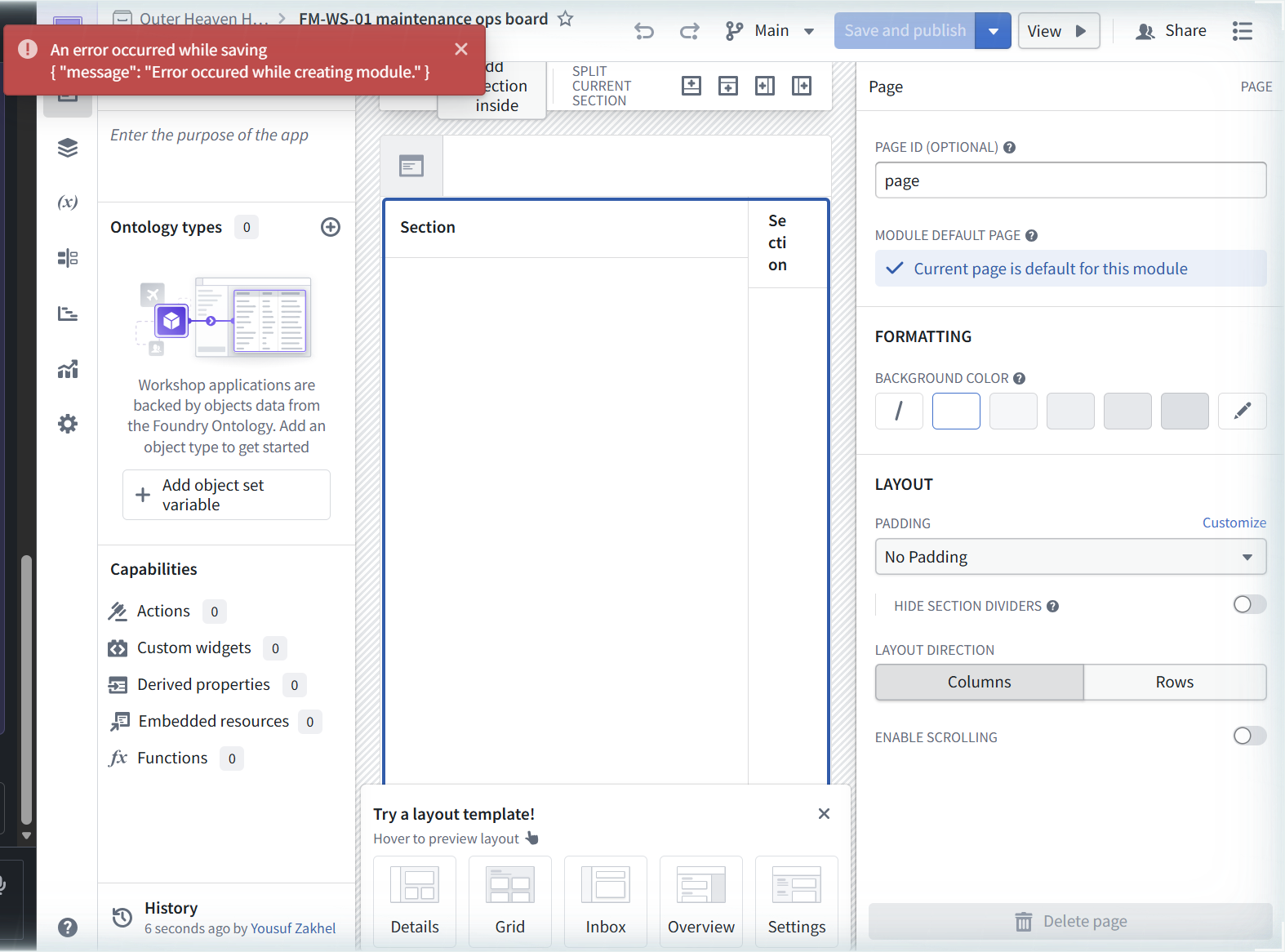
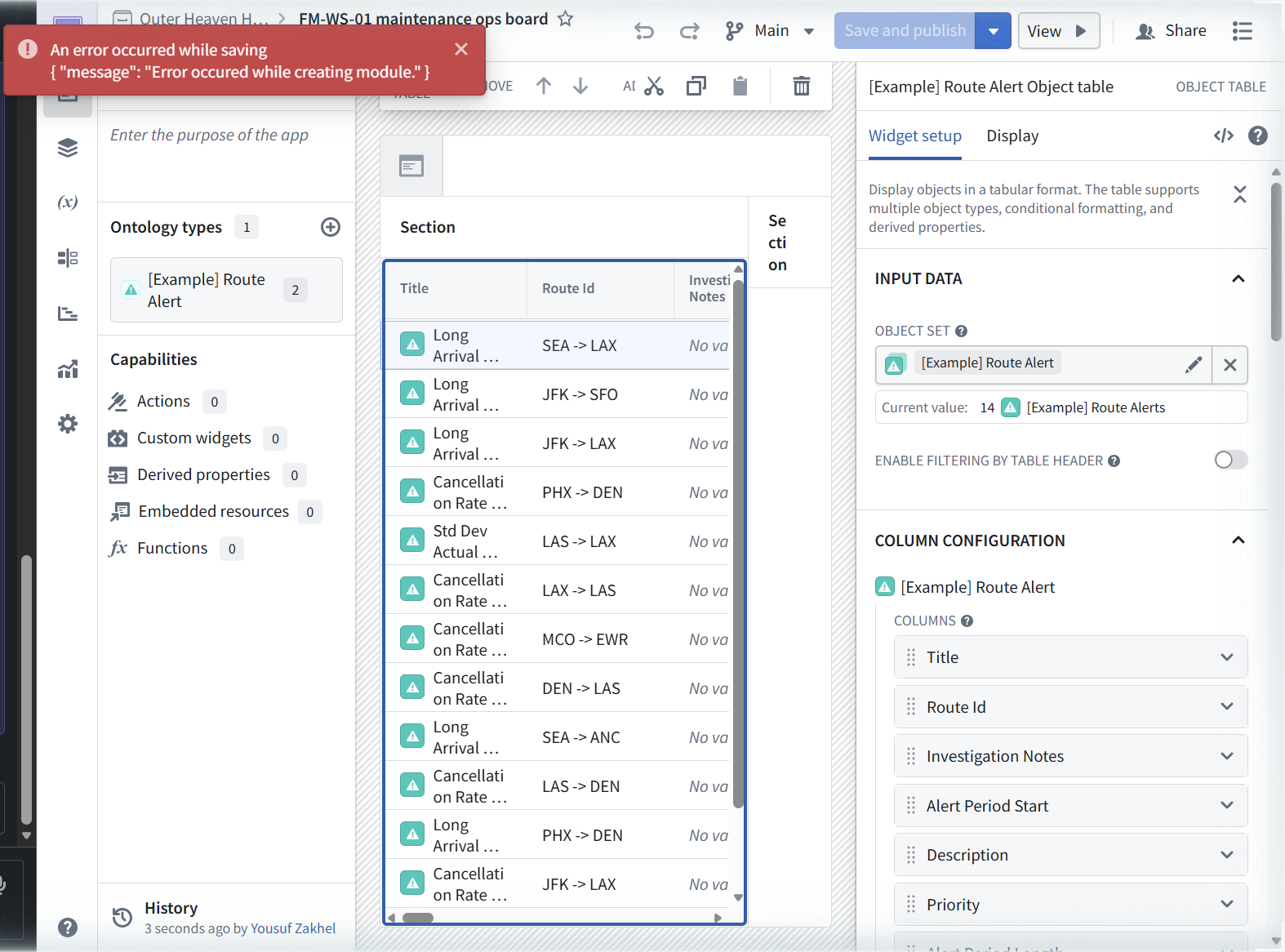
Then the first wall, and it is a strange one. A red toast: An error occurred while saving {"message": "Error occured while creating module."}. Read it closely. Two layers of error, an outer wrapper and an inner JSON message, and the inner one carries the platform's own typo: "occured". And here is the thing: the editor opened anyway, fully working. The toast repeated on every save attempt, at one point three instances stacked on screen at once, and the Save and publish button sat disabled.
Hold that thought. It resolves in Step 5, and the resolution is worse than the error.
[ STEP 2: THE EDITOR, AND THE PICKER THAT CANNOT SEE YOUR WORK ]
The editor anatomy, once you are in: a left rail with Overview (its empty description field prompts "Enter the purpose of the app"), Ontology types, Capabilities (Actions, Custom widgets, Derived properties, Embedded resources, Functions, all reading 0), and History. A center canvas holding one Section. A right config panel. A "Try a layout template" strip offering Details, Grid, Inbox, Overview, Settings.
First real move: add an object set variable. The picker lists what it can see, and what it can see is the main ontology's demo cargo: [Example] Route Alert Comment, Equipment, [Example] Flight Sensor, [Example] Airport, Operative, [Example][Log] Update Route Alert Status, [Example] Carrier, [Example] Route Alert, [Example] Route. Dropdowns for All ontologies, All groups, All resources. Note the [Example][Log] Update Route Alert Status entry in that list. It becomes the writeback target in FM-WS-02.
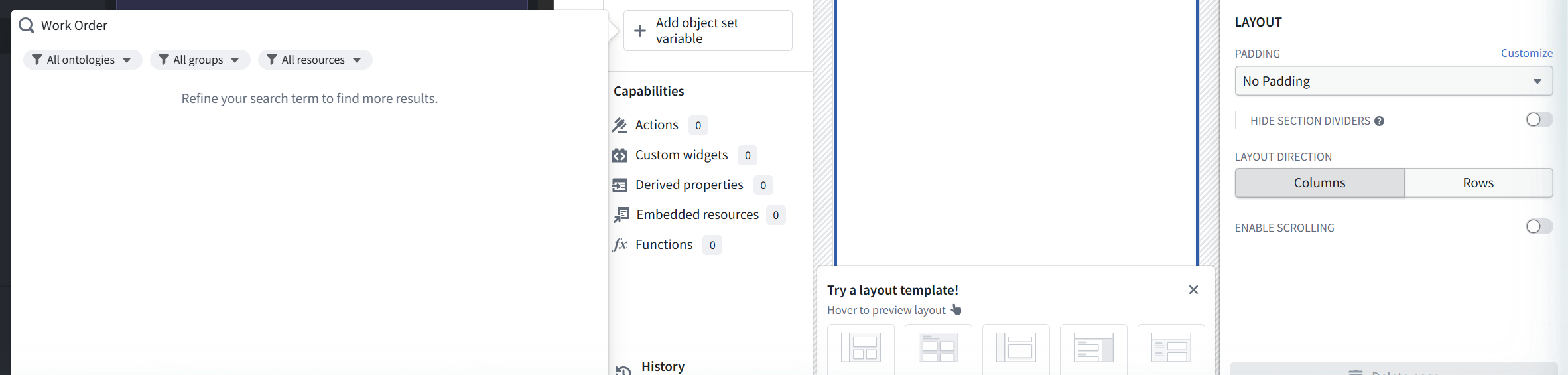
Searching this picker for "Work Order", our branch type with 66 real objects and a proven action, returns zero hits and one sentence, verbatim: "Refine your search term to find more results." Not "no results". Not "outside branch context". A suggestion that you typed wrong. Neither our Work Order nor the broken demo twin from FM-ON-02 FR-5 appears, which is at least consistent: the twin is unindexable, and ours is on the branch.
One more wall in the same neighborhood, and it fools everyone once. The top bar has a "Main" dropdown. That looks like branch context. It is not. Its contents: "Create new branch", "Main (Default)", and under "Your branches" two module branches (our shared lab branch and features/equipment-tuning). Our ontology branch is not in there, because this dropdown versions the Workshop module itself. Workshop apps read the main ontology. The ontology branch wall from FM-ON-01 and FM-ON-02 stands here too, wearing a different uniform.
[ STEP 3: PIVOT TO A TYPE THE APP CAN SEE ]
The pragmatic move, and the doctrine: when the branch wall blocks your type, build against a main-ontology type and keep the module structure identical, so the day the proposal merges you rebind the variable and keep the app. We selected [Example] Route Alert. The preview panel told us what we were getting: "14 objects", "10 dependents", sourced from the Yousufss Ontology, with 23 properties (Id, Title, Alert Period Length, and twenty more).

[ STEP 4: BIND THE TABLE ]
Select the section, hit "+ Add widget", and the catalog opens with tabs, verbatim: All | Properties & links | Visualize | Media | Filter | Writeback | Foundry & custom apps. Read that tab list once: Writeback is a first-class widget category, and it is the entire subject of the next module. Suggested cards: Object table ("Display objects data in a tabular format and allows for cell-level inline editing"), Metric card, Button group ("Add buttons that can trigger Actions, Workshop Events, exports, Commands, or open URLs"), Filter list, Chart: XY, Vega Chart.

Object table, added. Its config has exactly one required input: INPUT DATA > OBJECT SET. Under "USE AN EXISTING VARIABLE" it listed our [Example] Route Alert variable and an entry called "Object table 1 Active object". Bind the Route Alert variable. The table goes live in the editor with real data and says so, verbatim: "Current value: 14 [Example] Route Alerts".
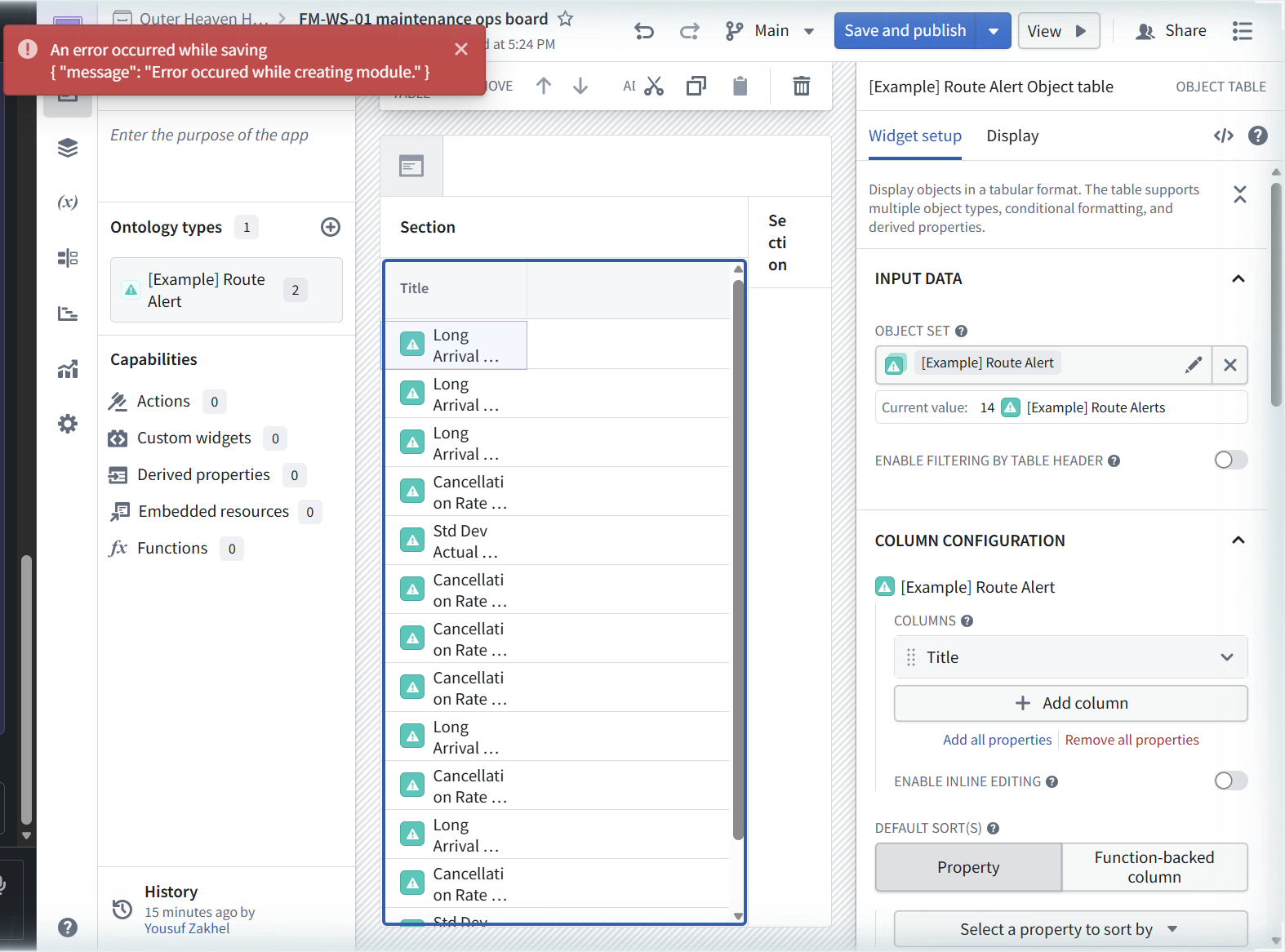
That "Active object" entry matters more than it looks. It is the table's selected-row output, the variable you bind an action's object parameter to. Remember it for FM-WS-02.
"Add all properties" pulls in the columns: Title, Route Id, Investigation Notes, Alert Period Start, Description, Priority. Real route pairs in the rows: SEA -> LAX, JFK -> SFO, JFK -> LAX, PHX -> DEN, LAS -> LAX, LAX -> LAS, MCO -> EWR, DEN -> LAS, SEA -> ANC, LAS -> DEN, LAX -> JFK.

[ STEP 5: PUBLISH, AND THE RESOLUTION OF THE LYING TOAST ]
Save and publish kept failing with the same creation error, so we went back to the splash page to start over, and found the resolution sitting in Recents: "FM-WS-01 maintenance ops board", creator Yousuf Zakhel. The module existed. It had existed the whole time. The creation error toast, with its doubled message and its typo, was lying: the module was created server-side, and the toast plus the disabled Save and publish button were the client's confused state, not the server's.
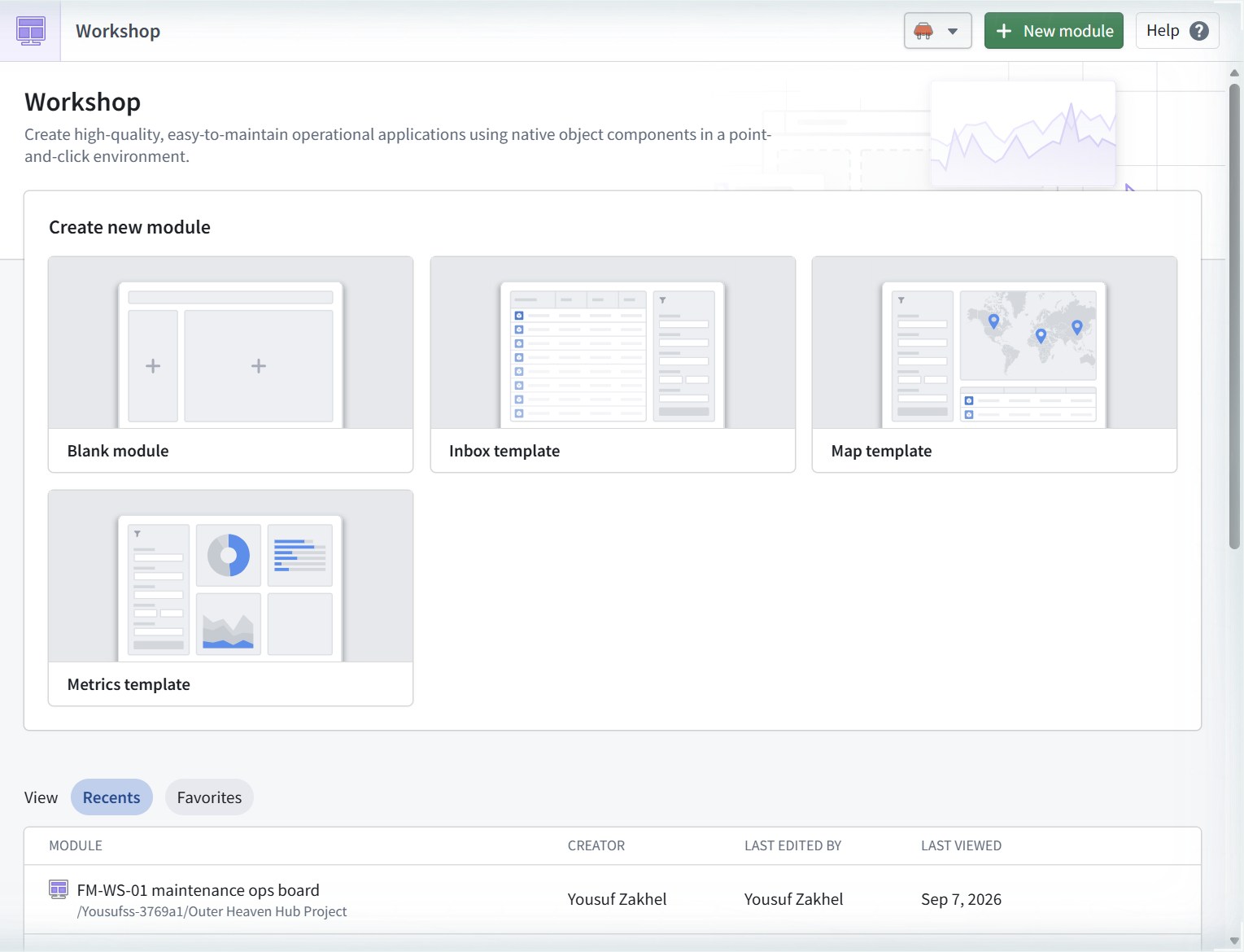
Reopening the module from Recents gave us a working editor (after dismissing a "What's new in Workshop" modal advertising visual rebasing and a new default search mode for keyword property filters, both dated early September 2026). Content intact. Save and publish now worked: v0.2.0, button disabled cleanly after, no toasts. The module got its RID: ri.workshop.main.module.ff2edd2c-307b-441c-8605-419e39bfb2c7.
Operational rule, and it generalizes beyond Workshop: when Foundry shows you an error on create, check whether the thing exists before you retry. Retrying a create that secretly succeeded is how you get duplicates; trusting the toast is how you lose an hour.
[ STEP 6: THE 300PX TRAP ]
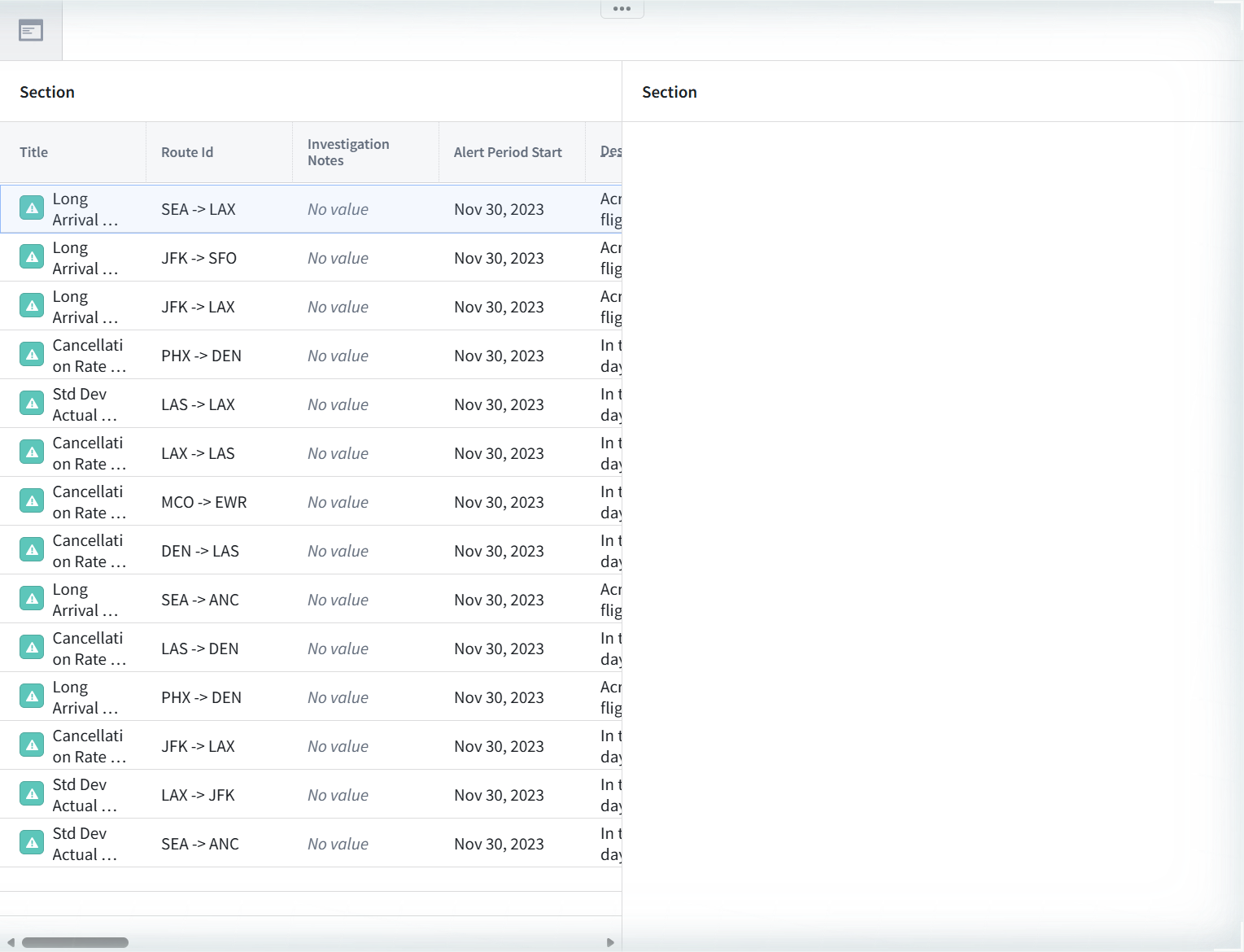
View the published app at /workspace/module/view/latest/ri.workshop.main.module.ff2edd2c-307b-441c-8605-419e39bfb2c7. All 14 rows render. And it looks broken: the table is squeezed into a narrow column with most properties cut off. The cause is the section's default width: Dimensions > Column width > Absolute, 300 px. A fresh Workshop section ships at a fixed 300-pixel column, which is a defensible default for a form and a terrible one for an object table.

The fix is one dropdown: Dimensions > Column width > Flex. While we were in there we titled the section "Route alerts". An "Autosaving..." indicator appeared (autosave kicks in after the first successful manual publish, not before). Save and publish, spinner, v0.3.0, clean.
Final published view: a wide table, columns Title, Route Id, Investigation Notes, Alert Period Start, Description. Two data observations that seed the next module: Investigation Notes reads "No value" on all 14 rows, and Alert Period Start is Nov 30, 2023 on every row. An ops board full of empty notes and identical dates is a board waiting for writeback. The demo [Log] Update Route Alert Status action we saw in the picker is the obvious tool. That is FM-WS-02.
[ FIELD REPAIRS ]
FR-1: the creation error toast lies. Symptoms: red toast, verbatim An error occurred while saving {"message": "Error occured while creating module."} (platform typo "occured" included), repeating on every save, three instances stacked at once, Save and publish disabled. Cause: the module was created server-side; the client state is wrong, not the server. Fix: go back to the splash page and check Recents. If the module is there, reopen it; Save and publish works from the reopened editor (v0.2.0 for us, clean). Do not retry the create. Evidence: 02-module-editor-save-error.png, 08-save-error-disabled.png, 09-module-persisted-in-recents.png.
FR-2: the object set picker cannot see branch resources. Symptoms: the variable picker lists main-ontology demo types only; searching "Work Order" returns zero hits with the verbatim text "Refine your search term to find more results.", a string that implies a query problem rather than a visibility boundary. Cause: Workshop reads the main ontology; our Work Order type and Reassign technician action live on an unmerged branch. Fix: none inside Workshop. Build against a main-ontology type (we used [Example] Route Alert, 14 objects), keep the module structure generic, rebind after the proposal merges. Evidence: 03-workshop-workorder-search-zero.png, 04-route-alert-type-added.png.
FR-3: the Main dropdown is module branching, not ontology branching. Symptoms: a "Main" dropdown in the top bar that looks like branch context but contains "Create new branch", "Main (Default)", and module branches under "Your branches". Cause: Workshop versions the app itself; the ontology data context is main regardless. Fix: conceptual, not procedural. Know which "branch" each tool means before you go looking for your branch resources in an app. Evidence: observed in the editor top bar during the same session; the picker behavior in FR-2 is the proof.
FR-4: the default section width makes a published app look broken. Symptoms: published view renders the table squeezed into a narrow column, properties cut off, on an otherwise successful publish. Cause: section default is Dimensions > Column width > Absolute, 300 px. Fix: Dimensions > Column width > Flex, republish (v0.3.0 for us). Evidence: 10-published-app-view.png, 11-published-v030-final.png.
[ FAQ ]
Did the error toast ever mean a real failure?
Not in this session. Every instance of the creation error coincided with a module that existed in Recents and an editor that worked. We cannot prove it never means failure; we can say that on 2026-09-07 it meant success, three times in a row. Check Recents before you believe it.
Why not build the board on our Work Order type?
Because Workshop cannot see it. The picker searches the main ontology only (FR-2), and the top-bar Main dropdown versions the module, not the data (FR-3). The merge that would unblock this is pinned by stale demo resources, per FM-ON-01 FR-4. Building against [Example] Route Alert keeps the module real and the technique identical.
Is the demo data a problem for credibility?
No, and we say so in the open: the route alerts are the enrollment's own demo ontology, shown with their [Example] prefixes intact. The walls we hit (lying toast, branch blindness, 300px default) are platform behavior, identical no matter whose data is on screen.
Why Absolute 300 px as a default at all?
Probably because most sections in most templates hold narrow things: forms, metric cards, filter lists. An object table with 23 columns is the case where the default hurts, and it hurts exactly on first publish, the moment a new builder is least equipped to diagnose it.
What is "Object table 1 Active object" doing in the variable list?
It is the table's selected-row output variable, created with the widget. Click a row in the running app and that variable holds the clicked object. It is the binding target that makes row-scoped actions possible, and FM-WS-02 is built entirely on it.
[ NOT TESTED ]
- Any Writeback tab widget (the entire category is deferred to FM-WS-02)
- Inline editing in the object table (the card copy promises cell-level inline editing; unexercised)
- Layout templates (Details, Grid, Inbox, Overview, Settings; we built from Blank)
- Inbox, Map, and Metrics module templates
- Metric card, Button group, Filter list, Chart: XY, Vega Chart widgets (catalog inspected, nothing added except the object table)
- Module branching via the top-bar dropdown (listed its contents, created no branch)
- Derived properties, Functions, Embedded resources, Custom widgets capabilities (all still 0)
- Rebinding the module to our branch Work Order type after a merge (blocked on the proposal)
[ NET POSITION ]
The enrollment has its first Workshop app: FM-WS-01 maintenance ops board, ri.workshop.main.module.ff2edd2c-307b-441c-8605-419e39bfb2c7, published v0.3.0, one section, one object table, 14 demo route alerts with all properties as columns, Flex width, viewable at /workspace/module/view/latest/. The branch wall followed us into Workshop: apps read main, the picker cannot see our Work Order type or its action, and the Main dropdown is a decoy. The session's real yield is four field repairs, the worst of them a creation error toast that reports failure, typo and all, while the server succeeds. The board is read-only, and the empty Investigation Notes column on all 14 rows is the standing invitation: FM-WS-02 wires the demo Update Route Alert Status action to the table's active object and closes the loop for real.